
Sleepy Time Lite2.3.1 - Get APK
You'll be able to download in few seconds.
Publisher Description


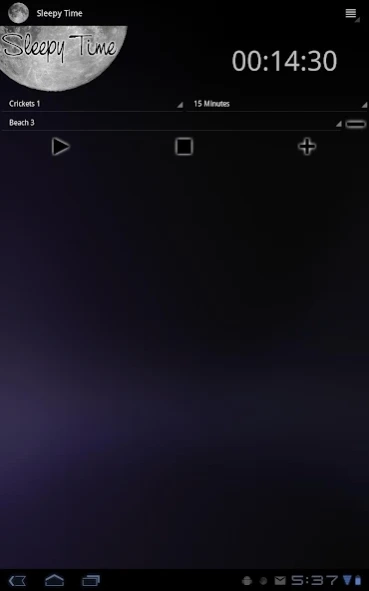
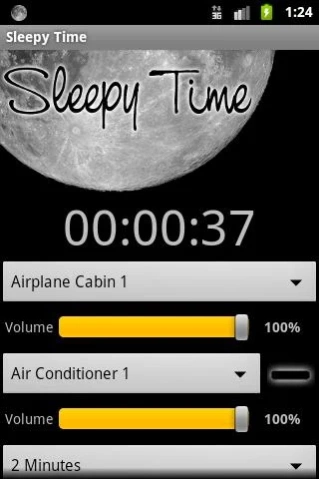
Sleepy Time is a sound machine designed to help you sleep better.
**This is a simple ad supported version of Sleepy Time. For full version download "Sleepy Time."**
Forget about counting sheep, a night of restful sleep awaits! All you need is Sleepy Time and you'll be out like a light, and en route to the Land of Nod with over 80 relaxing sounds from Sleepy Time.
Your Rx for Sleep
1000mg Sleepy Time (take as needed)
Directions for use (Use Only as Directed):
======================================
1. Choose Your Sleepy Time Sounds
Sleepy Time offers a wide assortment of audio tracks specially designed to lead you gently into the arms of slumber. You can choose from various sounds including the beach, birds, crickets, and white noise. You have over 70 total sounds to choose from, and if that isn’t enough you can mix and match up to three sounds to create our own unique sleep-scape to help you get your 40 winks. Over 300,000 possible sound combinations!
Sound options include the following. In many cases, there are several different versions of each sound.
Things That Whir, Hum, Chime, Tick, and Tock:
Air conditioner, ceiling fan, train, driving, fish tank, highway, clock, microwave, radio static, truck engine, vacuum cleaner, typing, washer and dryer, white noise, pink noise, brown noise, wind chimes, airplane cabin, sprinkler, clothes dryer
Nature Sounds:
Waterfall, babbling brook, river, campfire, camping, wind, fountain, distant thunder, thunder storm, rain, beach, river, under water
Wild Things:
Frogs, birds, cicadas, crickets, whale, dolphin, purring cat, heartbeat
Other Sounds:
Urban noise, farm house, and even snoring
2. Set Your Sleep Timer
Next set the sleep timer. You can choose increments in minutes or hours. Or, if you feel like sleeping on the beach or are missing your cat while away from home, select the Continuous play option and you'll hear the soothing sound of waves or purrs all night long. Sleepy Time continues to run after the screen turns off or if you switch apps on your phone or tablet.
3. Zzzzzzzzzzzzzzzzzzzzzzzzzzz
What are you waiting for? Starting sleeping well with Sleepy Time!
Side Effects
===================
Users of Sleepy Time have reported having a more restful night of sleep. Other side effects include: drowsiness, good dreams, awaking fully rested, decreased tiredness, visions of the sandman, less tossing and turning, and a general feeling of relaxation.
Your happiness with our product is very important to us. If you run into problems, please contact us using the email link provided.
Notice
========================
• Requires a SD card
Permission Justification
========================
You privacy is important to us. Here is an explanation of the permissions requested and what the purpose of each is.
Storage – This permission is used to save sound files to the SD card.
Network Communication – Used to download sounds.
Phone calls – Used to detect incoming phone calls so Sleepy Time can stop playing sounds.
System tools – Used to prevent phone from sleeping while sounds are playing.
About Sleepy Time Lite
The company that develops Sleepy Time Lite is CWS Software LLC. The latest version released by its developer is 2.3.1.
To install Sleepy Time Lite on your Android device, just click the green Continue To App button above to start the installation process. The app is listed on our website since 2014-06-12 and was downloaded 0 times. We have already checked if the download link is safe, however for your own protection we recommend that you scan the downloaded app with your antivirus. Your antivirus may detect the Sleepy Time Lite as malware as malware if the download link to org.fogproject.sleepytimedemo is broken.
How to install Sleepy Time Lite on your Android device:
- Click on the Continue To App button on our website. This will redirect you to Google Play.
- Once the Sleepy Time Lite is shown in the Google Play listing of your Android device, you can start its download and installation. Tap on the Install button located below the search bar and to the right of the app icon.
- A pop-up window with the permissions required by Sleepy Time Lite will be shown. Click on Accept to continue the process.
- Sleepy Time Lite will be downloaded onto your device, displaying a progress. Once the download completes, the installation will start and you'll get a notification after the installation is finished.
Program Details
System requirements
Download information
Pricing
Version History
version 2.3.1
posted on 2014-06-13
* Now with 87 sounds!
version 00.02.07
posted on 2010-03-29
Several fixes and updates
Disclaimer
External Download
We do not host Sleepy Time Lite on our servers. We did not scan it for viruses, adware, spyware or other type of malware. This app is hosted by Galad and passed their terms and conditions to be listed there. We recommend caution when installing it.
The APK Download link for Sleepy Time Lite is provided to you by apps112.com without any warranties, representations or guarantees of any kind, so access it at your own risk.
If you have questions regarding this particular app contact the publisher directly. For questions about the functionalities of apps112.com contact us.
